 Snipora
How to open your local dev server on your phone
The page loads on your phone, then every API call fails. Two settings fix it: let the dev server listen on your network, and stop calling localhost from the browser.
By Anmol Sethi · Updated
1. Let the dev server listen on your network
Vite listens on localhost only by default, so nothing outside your Mac can reach it. Turn that on in the config, so you don’t have to type --host every time:
// vite.config.js
export default {
  server: { host: true },
};
Vite then prints a Network address next to the local one:
  ➜  Local:   http://localhost:5173/
  ➜  Network: http://192.168.1.33:5173/
Open the Network address on a phone on the same Wi-Fi. If you need the address yourself, ipconfig getifaddr en0 prints it (en1 on some Macs). If the macOS firewall is on, allow incoming connections for node when it asks.
Rather click than type? Portlivo shows every port with its project and frees it in one click. Try it free for 7 days →
2. Why API calls to localhost fail on the phone
Your app calls http://localhost:3001/api/.... On your Mac that’s your API. On the phone, localhost is the phone itself, where nothing listens on 3001, so every request fails while the page itself loads fine.
The cleanest fix is to let Vite forward API calls, so the phone only ever talks to Vite and Vite talks to the API on your Mac:
// vite.config.js
export default {
  server: {
    host: true,
    proxy: { "/api": "http://localhost:3001" },
  },
};
Then call /api/... instead of http://localhost:3001/api/... in the app. It works the same on your Mac and on the phone, and there’s no CORS to set up because the browser sees one origin. If your API’s routes don’t start with /api, strip the prefix: rewrite: (p) => p.replace(/^\/api/, "").
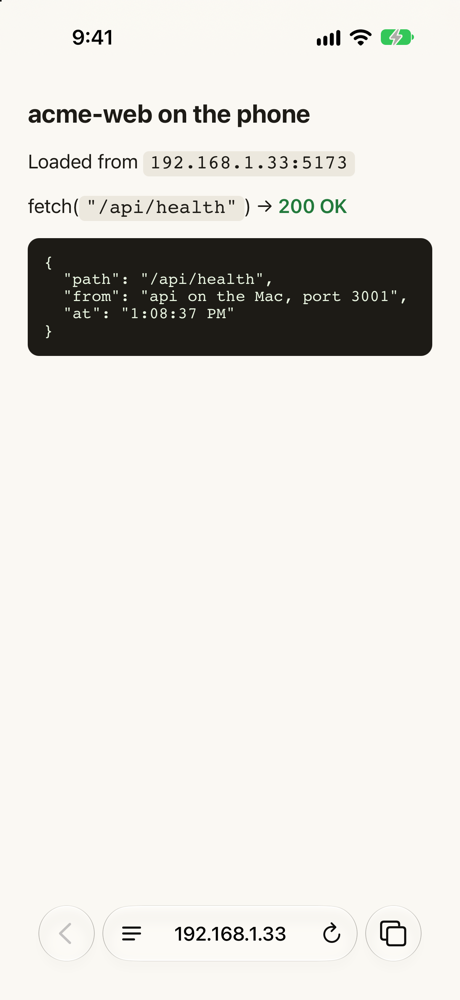
The API can stay on localhost: Vite reaches it on your Mac. Only Vite has to listen on the network. NestJS and Express listen on every interface by default, which is fine but not needed with the proxy.
Other ways
- Use the Mac’s IP in the API URL (
VITE_API_URL=http://192.168.1.33:3001). Works, but the API must listen on the network, needs CORS for the phone’s origin, and breaks when your IP changes. - A tunnel (
cloudflared tunnel --url http://localhost:5173, ngrok) gives an HTTPS URL that works off your Wi-Fi too, useful for camera, geolocation and other APIs that need HTTPS.
The one-click way: Portlivo
Portlivo marks servers your phone can reach, and Show QR Code for Phone in a row’s menu puts the network address on screen, so you scan it instead of typing the IP. Servers that only listen on localhost don’t get a QR code, which is your hint to add host: true.
Questions people ask
- Why does my Vite app not load on my phone?
- Vite listens on localhost only. Start it with
vite --hostor setserver.host: true, then open the Network address it prints, with the phone on the same Wi-Fi. - Why do API calls fail on the phone but work on the Mac?
- The app calls
localhost, which on the phone is the phone. Proxy the API through Vite (server.proxy) and call relative paths like/api/.... - Does hot reload work on the phone?
- Yes. With the page opened from the Network address, Vite’s hot module reload connects over the same address.
Try Portlivo free for 7 days. Every feature, no account.
Download for MacSend to my MacStill have a question?
Write to us — a real developer reads every email and replies personally.